Source file
Mermaid Snap
A lightweight VS Code extension that provides live Mermaid diagram rendering inside the sidebar — perfect for visualizing flowcharts, sequences, and graphs while coding.
Features
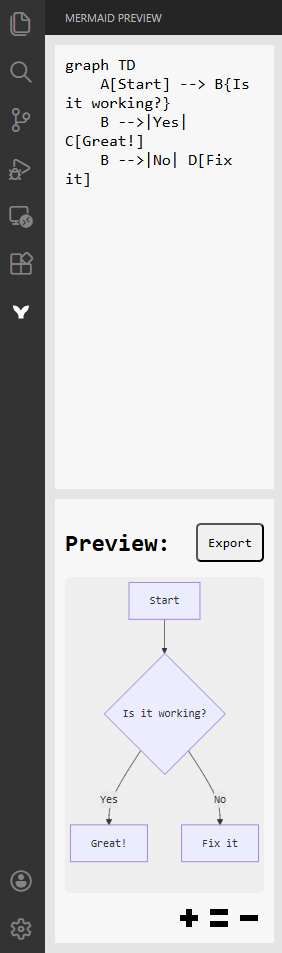
1. Real-Time Mermaid Preview
- Opens directly in the VS Code sidebar.
- Type Mermaid syntax in the textarea and instantly see the rendered diagram below.
- Automatically updates after a short delay when editing stops.
- Uses an isolated iframe for clean rendering and layout consistency.
2. Supported Diagram Types
Supports all Mermaid diagram formats, including:
- Flowchart (
graph TD,graph LR) - Sequence Diagram (
sequenceDiagram) - Class Diagram (
classDiagram) - State Diagram (
stateDiagram) - Entity Relationship Diagram (
erDiagram) - Gantt Chart (
gantt) - Pie Chart (
pie) - Mindmap, Timeline, and more (depending on Mermaid version)
3. Preview Layout
- The editor is split vertically:
- Top: Mermaid text editor
- Bottom: Rendered SVG diagram preview
- The diagram automatically fits and centers within its area.
- The preview area uses a flex layout and auto-adjusts to any diagram size.
4. Rendering Engine
- Built on Mermaid (standalone JS build).
- Renders diagrams to SVG for precise scaling.
- Removes inline width and height limits to allow responsive resizing.
- Uses an internal iframe to isolate styles from VS Code’s theme or other extensions.
5. Minimal UI
- Clean, distraction-free layout.
- Automatic light/dark theme adaptation from VS Code.
- Uses
Consolas, Courier, monospacefont for consistency. - Default placeholder: Type your mermaid here...
License
MIT License © 2025 lyuwenhan