Source file
Sidebar Notes
A lightweight VS Code extension that adds a simple note-taking area to the sidebar - ideal for writing quick thoughts, reminders, or temporary text while coding.
Features
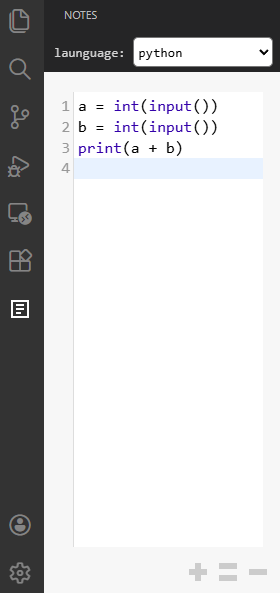
1. Sidebar Notepad
- Opens directly inside the VS Code sidebar.
- Provides a single, large textarea for typing notes.
- Supports multiple languages with syntax highlighting powered by CodeMirror:
- plain text
- markdown
- javascript
- python
- c
- c++
- java
- json
- html
- css
- shell
- sql
- yaml
- Supports Alt + Mouse Wheel or toolbar buttons (
+,=,–) to adjust font size. - Allows toggling Preview Mode for Markdown and HTML.
2. Syntax Highlighting
- Integrated with CodeMirror for smooth editing and syntax coloring.
- Supports auto-close brackets, auto-close tags, and matching brackets.
- Adjustable font size for comfortable reading.
- Keeps the cursor position and scroll location when switching languages.
3. Markdown & HTML Preview
- Preview Mode can be toggled manually by clicking the Preview button.
- Not real-time - content is rendered only when entering preview mode.
- Uses:
- Prevents unsafe HTML and scripts for secure rendering.
4. Minimal UI
- Clean layout - no menus, no toolbars.
- Uses
Consolas, Courier, monospacefor a code-friendly look. - Displays placeholder text when empty: Write your notes here...
5. Color Themes (Light / Dim / Dark)
- Choose between Light, Dim, and Dark color schemes for the notes panel, or let it follow your VS Code theme automatically.
- Configurable via the
sidebarNotes.themesetting:auto(default) - follow the active VS Code color theme.light- light color scheme.dim- muted dark scheme (easy on the eyes).dark- full dark scheme.
- Applies to the editor background, line numbers, syntax highlighting, and the Markdown / HTML preview.
- Switches live when the setting is changed - no reload required.
Quick switching
- In-panel button: a theme icon sits next to the
+ = -font-size buttons in the bottom-right of the Notes panel. Click it to cycleauto → light → dim → dark. - Command palette:
Sidebar Notes: Switch Themeopens a picker with all four options (also bindable to a keyboard shortcut).
License
MIT License © 2025 lyuwenhan